THE ICON LEGEND
26
SPOT VALUE INSTANTLY
ICONS ON REDPAINT
ICON LEGEND

SPOT VALUE AT A GLANCE
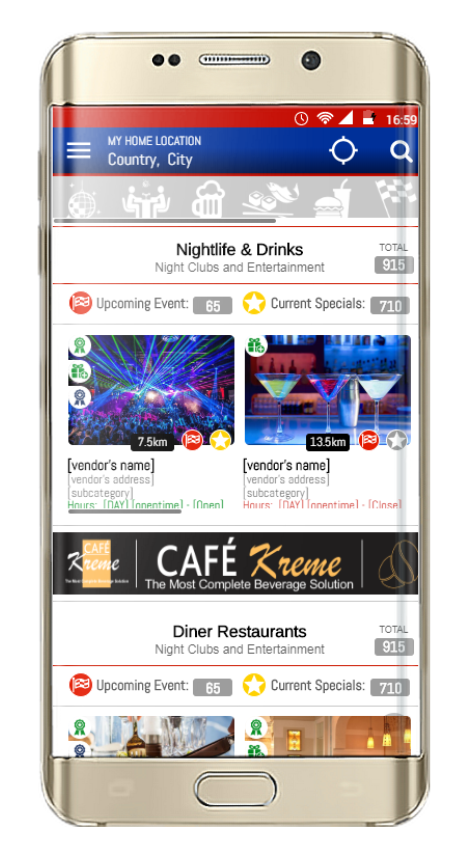
RedPaint uses icons within the app as visual indicators, making it easy for users to quickly identify key vendor attributes. At a glance, users can see if a vendor is offering special deals, hosting upcoming events, or providing rewards and free gifts.
These icons automatically appear when vendors activate specific offerings and disappear once they expire. This dynamic display encourages users to engage with a vendor’s profile, as more icons on a profile image in the feed signal exciting opportunities.

SPECIAL OFFERS
The Special Offer Icon is displayed on the vendor's primary image in listings and on their profile page whenever they have current or upcoming specials available.

EVENTS
The Events Icon is displayed on the vendor's primary image in listings and on their profile page whenever they have current or upcoming events.

REDPAINT LOYALTY POINTS
This icon is referred to as the RedPaint Loyalty Point Icon. It can be found in various locations within the RedPaint app and consistently signifies the amount of RedPaint Loyalty Points accrued by the user for both sharing the Red Paint app and inviting new vendors to join RedPaint.

VENDOR SPECIFIC LOYALTY POINTS
The green icon is known as the Vendor Specific Loyalty Point Icon. It is prominently displayed in multiple locations within the RedPaint app, consistently showcasing the quantity of loyalty points accumulated by the user for sharing specific Vendor information, including Special Offers, Events, Rewards, and their profile page.

REDPAINT REWARDS
The blue rosette icon is displayed on a vendor's primary image in listings and on their profile page when they are offering RedPaint Rewards for users who have earned RedPaint Loyalty Points. To check the details of your accumulated RedPaint loyalty points and discover which vendors offer rewards for them, visit the "My Loyalty Points" page.

VENDOR REWARDS
The green rosette icon is displayed on a Vendor's main image in listings and on their profile page when they are offering rewards to users. To view the details of your earned loyalty points with different vendors, you can visit your "My Loyalty Points" page.

FREE GIFTS
When vendors host any event, they can choose to offer attendees a Free Gift. In such cases, the Free Gift Icon will be displayed on their primary image in listings and on their profile page.